
Secure ecommerce Sites Against Modern Online Data Threats
Ecommerce sites face constant cyber threats as hackers target payment systems, login panels, and stored customer details daily. Without layered protection, businesses risk financial loss, damaged credibility, and long term customer distrust that can severely impact sustainable growth and brand reputation.
Ecommerce sites must adopt proactive security strategies to defend against evolving online data threats. From stronger authentication controls to regular system updates, every protective step helps secure transactions, protect customer trust, and ensure uninterrupted business operations across digital marketplaces.
Install Trust Badges To Build Customer Confidence
Trust badges instantly reassure visitors that your store values privacy, security, and safe payments. When shoppers notice verified symbols on checkout pages, they feel more confident sharing personal details, leading to higher conversions and reduced cart abandonment rates.
Building visible credibility requires trust badges placed strategically near payment sections and signup forms. These verification seals signal encrypted transactions and authentic operations, encouraging hesitant buyers to complete purchases without worrying about fraud or identity theft.
Customer hesitation often decreases significantly when trust badges appear beside guarantees and refund policies. Their presence demonstrates transparency, strengthens perceived reliability, and creates an emotional sense of protection that motivates first time visitors to return again.

Keep Systems Safe With Security Patches
Security patches are small but powerful updates that fix hidden weaknesses inside your website software. Cybercriminals often scan ecommerce platforms for outdated systems, knowing unpatched gaps make easy targets. Updating promptly helps close those doors before attackers even attempt entry.
Delaying security patches can silently increase your store’s exposure to malware and data theft. Consistent updates keep performance stable while reducing risks that damage customer trust and business credibility.
- Install updates as soon as vendors release them
- Test patches on a staging site first
- Remove outdated plugins before applying updates
- Turn on automatic notifications for critical fixes
- Keep a simple update tracking record
- Review site performance after every patch installation
Stop Brute Force Attacks Using Strong Passwords
Strong Passwords act as the first defense against automated login attacks targeting administrative dashboards and customer accounts. Complex combinations of letters, numbers, and symbols reduce the chances of unauthorized access and protect confidential store information.
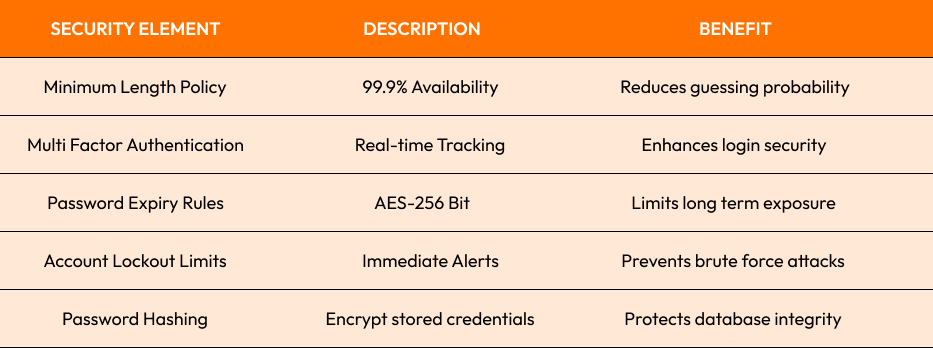
Strong Passwords combined with monitoring tools significantly reduce account takeover risks. When teams follow strict password policies and encourage customers to create secure credentials, overall system resilience improves while preventing costly security incidents.
Monitor Admin Access To Prevent Internal Leaks
Admin access should always be limited to trusted personnel with clearly defined roles and responsibilities. Restricting permissions reduces the risk of accidental data exposure and prevents misuse of sensitive information within internal management systems.
Preventing serious internal threats requires careful admin access management across all departments. Implement role based controls, track login activity, and review permissions regularly to ensure employees only access information necessary for their specific responsibilities.
Effective oversight becomes stronger when detailed activity logs monitor admin access continuously in real time. Suspicious behavior can be detected early, helping businesses respond quickly before confidential records or financial data are compromised.

Backup User Data To Ensure Quick Recovery
Every online business user data protection strategy must include automated backups stored securely offsite. Regularly testing recovery systems ensures that unexpected breaches, hardware failures, or ransomware attacks do not permanently damage valuable business information.
Secure user data backups minimize downtime and maintain operational continuity during emergencies or cyber incidents.
- Schedule automatic daily backups for critical databases
- Store encrypted copies in secure cloud environments
- Test restoration processes to ensure backup reliability
- Maintain multiple recovery points for flexibility
- Restrict backup access to authorized administrators
Conclusion
Securing ecommerce sites requires consistent attention, strategic planning, and proactive monitoring. By combining encryption, strict authentication, controlled permissions, and reliable backups, businesses can reduce vulnerabilities, strengthen customer confidence, and build a trustworthy digital presence that supports long term growth.
Ready to strengthen your store’s security and protect customer trust? Explore our expert solutions here: Ecommerce web development services and safeguard your business today. to optimize your site further.
Start Your Expert Consultation
Please write your name and contact information below. We will respond as soon as possible.