
Project Management Software: Choosing the Right Tool for Agile Development
The appropriate project management software brings order to the designed chaos of Agile methods. The best tools do more than house tasks. They integrate the ability to design sprints, visualize progress and maintain velocity on a goal without cluttering the process.
Agile Development and Contemporary Project Methods
Agile Development relies on short time cycles and the iterative incorporation of feedback. Therefore, systems must be able to support speed, and inclusivity of all levels of visibility, and collaboration. For the majority of teams, the appropriate project management vendor will be the one whose solution fits their way of working the best in the least amount of effort.
Research and industry related publications agree: Agile tools are extremely valuable when backlog management, sprint planning, reporting, and team communication are all integrated in a single tool. Poorly designed tools create a setup for handoff failures, lack of clarity on what the priorities are and an inordinate amount of time being wasted on status updates as opposed to the actual work

What Should You Focus On When Choosing a Project Management Tools?
The best project management tools strike a good balance between allowing teams to collaborate and keeping managers up to date. For example, a tool that can't show who is responsible for a task, who's dependent on the task, and when it's due and what progress has been made will stifle a highly collaborative team. For Agile teams, that visual clarity is not a luxury; it's the whole point.
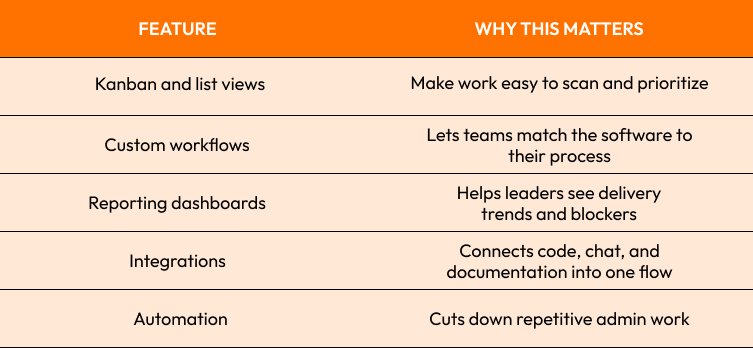
If the tool saves time doing admin work but creates time lost in training, it is the wrong choice. Many teams pick software because it looks powerful, but in real Agile environments, simplicity often wins.
Sprint Planning, Task Tracking, and Workflow Management
Priorities should be clear before the sprint planning meeting. Teams should enter the sprint with a groomed backlog, and a shared understanding of “done,” as well as realistic estimates. The software should make this visible to the team and not hide it in another menu.
Once the sprint has started, strong task tracking becomes important. A good team uses boards, task dependencies and status updates to spot blockers and help reallocate the staff and resources before deadlines are missed. In a practical sense, this is often where the project management software gains real value - it takes the teams movement, and the movements of all teams for that matter, and turns it into valuable measurable progress instead of guesswork.
In product or engineering teams, there is a prominent case study model. Small teams like simple Agile boards and light reporting. Large software teams need different levels of issue tracking, release planning, and development integrations. Agile software vendors provide guidance stating that tools for Sprint planning are helpful when they lessen friction between planning, executing, and reviewing.

The Asana vs Jira vs. ClickUp debate
The Asana vs Jira debate is usually between complexity and control. Jira is usually the right choice for technical teams because it does issue tracking and development workflows and sprint logic. Asana is easier to adopt, works better for teams wanting clean task coordination with minimal setup. ClickUp is in the middle with many features teams wanting to do everything in one workspace.
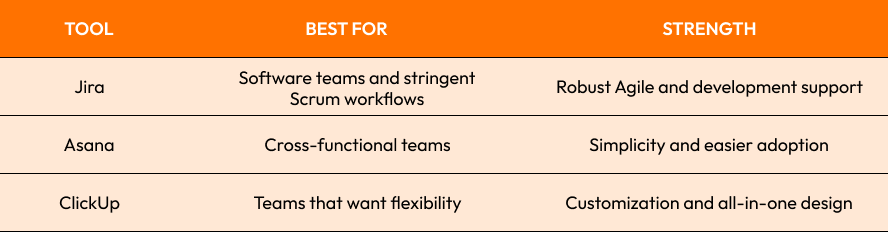
Asana usually provides faster value for non-technical teams, mixed teams and teams frustrated by complex setups. ClickUp has an appealing design, but teams should use it honestly to avoid under utilizing its features or losing focus.
Things to Keep in Mind When Selecting a Project Management solution
Understanding the way that your team actually works is a good place to start when choosing a project management solution. Consider the size of your team, the skill levels, your budget, your reporting needs, and the kinds of integrations you require. Companies of different sizes and at different stages of development have very different needs. For example, a five-person startup does not have the same needs as an enterprise with multiple teams and multiple release cycles.
A good project management tool is one that your team will actually use. If the tool feels clunky, the team will revert back to using spreadsheets and chat tools for project management and communication. In situations like this, power actually works against the tool, and the best project management tools actually balance usability with power.
A lot of teams overlook the cost of change. Tools should be chosen to fit current needs and be flexible enough to grow with the team. The best project management tools actually improve planning, communication, and the execution of tasks.
Additionally, project management tools should not be chosen solely on their popularity. The best tools are the ones that help teams do the best work with the least amount of effort. This is the ultimate goal of any project management framework.

Wanna find Best Tool for Agile Development
If you are ready to find the best tool to fit your team's needs, head over to the contact us page . Our team of experts is ready to help you find the best tool to fit your project management needs.
Start Your Expert Consultation
Please write your name and contact information below. We will respond as soon as possible.