
Interaction Design Principles for Modern Web and Mobile Interfaces
Users who can easily complete their tasks without feeling frustrated, quickly and confidently are more likely to be satisfied with digital products. Every click, swipe or tap can make a difference to the user's experience, whether they are shopping, using SaaS, managing their finances, booking services, etc.
Interaction Design Principles is essential. The interaction design process focuses on the way users interact with digital products, and how they respond. The focus is not just on visual appeal, but also includes usability, engagement, behavior and responsiveness.
Websites and applications for mobile devices are supposed to be intuitive. Before using any product, users rarely read the instructions. They rely instead on patterns they are familiar with and the immediate responses of their system to guide them.
It is my opinion that the best interfaces do not need users to even think about them.
A good interaction design will reduce confusion and improve task completion rates. It also creates an experience that feels natural right from the start.
The Core Principles for Interaction Design of Modern Interfaces
Every digital product that is successful follows a few Core Principles to make interaction easier and predictable.
The designers can use these principles to create technology that is more in line with human behaviour, rather than trying to force users to adapt to new technologies.
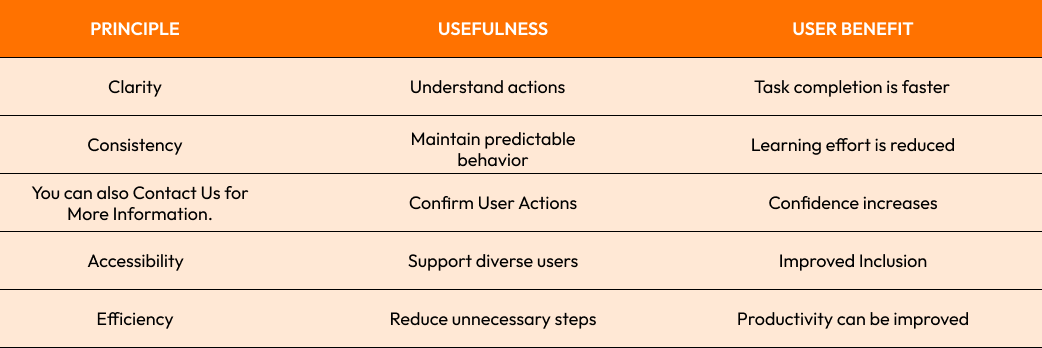
The following are some of the key principles:
Clarity
Consistency
You can also Contact Us for More Information.
Accessibility
Efficiency
Learning Ability
Always make sure that you understand the following:
What are the available actions?
Next up:
If an action is successful
What to do when you make a mistake?
When a user presses a certain button, he or she should see a visual confirmation. Uncertainty increases without confirmation.
This is a quick overview:
Apple has built its reputation by maintaining strong standards of interaction that are familiar on all devices and across applications.
Users should not have to guess at how an interface functions. The design is already causing friction if they have to guess.

Keep Users Engaged and Informed with User Feedback Systems
User feedback is one of the overlooked features of digital products.
The feedback is a dialogue between the users and their systems. Each action must be followed by a confirmation of what occurred.
Examples include:
Loading indicators
Success messages
Notifications of Error
The progress bars
Hover over the states
Validation messages for forms
Users often make assumptions about problems without feedback.
Online payments is a common example. Payment information must be clearly displayed when users enter payment details.
Process Status
Success
Error handling steps
Nielsen Norman Group research consistently shows how clear feedback from systems improves customer satisfaction and decreases abandonment.
Google Forms has a case study that is practical. The real-time verification alerts the user immediately if information is incorrect or missing. This reduces submission errors by a significant amount.
A good feedback system should:
Immediate
Relevance
Simple to Understand
Non-disruptive
Strong opinion:
The silence is among the worst experiences for users. Each important act deserves an appropriate response.
The impact of microinteractions on user experience
microinteractions are often responsible for the polished feel of modern digital experiences.
The microinteractions that are triggered by user action can be small.
Examples include:
Animations of the Like Button
Confirmation by swipe
Alert badges
Pull-to-refresh indicators
Measures of password strength
These interactions, although small in size, play an important role in the usability of the app and its engagement.
It helps users to:
Understanding system status
You will receive confirmation
Confidence is key
Smoother interaction
Facebook's response system is an example that everyone knows. Simple animations confirm the interaction instantly and make it more fun.
Four components are often present in well-designed microinteractions:
Trigger
Rules
You can also Contact Us for More Information.
Loops and modes
The elements of communication are important for a meaningful relationship between the users and their systems.
Strong opinion:
microinteractions aren't decorative details. These are tools to help the user understand what's happening.
They make the product feel alive and responsive when used properly.

The interface design should be consistent, predictable, and usable.
Consistency is key to a successful interface design.
Repetition helps users learn patterns of interaction. Confusion increases when similar actions are performed differently on different screens.
Consistency is:
Buttons
Menus
The Icons
Formal behaviors
Error handling
Layout Structures
Users can easily transfer their previous product knowledge to other sections.
Airbnb is a good example. The interaction patterns are consistent across the entire platform, whether users manage bookings, browse listings or update their profiles.
The consistency of the metrics can also be improved by:
Rates of task completion
User satisfaction
Error reduction
Retention
Predictability of interaction is another important factor.
Before taking any action, users should have the ability to predict what will happen. Unexpected outcomes can be frustrating and cause a loss of trust.
It is important to note that consistency does not mean every screen must look the same. Every interaction should feel comfortable.
Users can focus more on their goals by using predictable systems.
Accessibility considerations in interaction design
Modern interaction design should be able to work with people of different abilities, devices and preferences.
It is more than just a requirement for compliance. This is an usability requirement.
Accessible interaction systems support:
Keyboard Navigation
Screen Readers
Voice controls
Touch interaction
Accessible technologies
Accessibility practices that are important include:
Focus indicators
Big touch targets
Labels with Meaning
Proper contrast ratios
Reduction in motion options
The World Health Organization estimates that more than a billion people live in the world with varying degrees of disability. Designing experiences that are accessible increases usability and benefits a large portion of the global population.
Microsoft's Inclusive Design Framework demonstrates that accessibility improvements are often beneficial to all users and not only those with disabilities.
As an example:
Mobile users will benefit from larger buttons
Everyone benefits from clear labels
Improved contrast makes it easier to read in brighter environments
Accessibility should not be considered an option. This is a part of professional digital product creation.
Most successful products work for the largest possible audience.
Last Thoughts
Strong Principles of Interaction Design influence how digital products are used by users.
Every interaction, whether it's a thoughtful microinteraction or a consistent interface design, impacts user satisfaction and success.
Common Interaction Design Challenges:
Unclear Navigation
Feedback systems with weak feedback
Interactions that are inconsistent
Accessibility support is poor
Workflows that are too complicated
The Best Practices
Clarity is more important than complexity
Give immediate feedback
Microinteractions are important.
Consistency across all interfaces
Accessible design is important
Strong opinion:
Users seldom remember specific design elements but always the way a product makes them feel. A great interaction design builds confidence, comfort and trust.

Are you ready to create better digital experiences?
Crescentic Digital helps businesses create modern mobile and web experiences by using proven Interaction Designing techniques that increase usability, customer engagement and satisfaction.
Want to develop intuitive digital products users will enjoy?
Visit our Contact page and we'll build an experience that combines usability, accessibility, and performance in order to deliver quantifiable business results.
Start Your Expert Consultation
Please write your name and contact information below. We will respond as soon as possible.