
Data visualization design: Presenting complex information clearly
Every day, modern businesses produce enormous volumes of data. Data is used to help organizations make better decisions. Raw numbers rarely provide a convincing story. Even valuable information may become difficult to understand and interpret without a proper presentation.
Data Visualization Design is a key component in this. Data visualization is the art of transforming complex data into visual insight. Users can identify trends, patterns and relationships without having to spend hours on spreadsheets.
Effective visualization has become a key component in modern digital products. This is especially true for those that are focused on business intelligence and reporting.
An information-rich dashboard isn't necessarily useful. More charts can often confuse rather than improve understanding.
Visualization isn't just about displaying data. It is also to help the user understand and take action.
The Role of Data Visualization in Modern Digital Products
Data-driven experiences are becoming increasingly important for modern digital products. Visual reporting is used by SaaS platforms and analytics tools as well as healthcare applications, financial apps, and ecommerce platforms to make information more understandable.
Visual information is processed much faster by humans than numerical or textual tables. Charts, graphs and dashboards are now standard in most business applications.
Effective data visualization design can help users:
Identify trends quickly
Compare performance metrics
Detect anomalies
Monitoring KPIs
Make faster decisions
Platforms like Google Analytics, for example, simplify the millions of data points through visual reporting structure that allows marketers to instantly understand website performance.
The visualisation of data also enhances communication with stakeholders. Visual dashboards can be used to emphasize the most important metrics instead of lengthy reports.
This is a quick overview of the most common benefits:
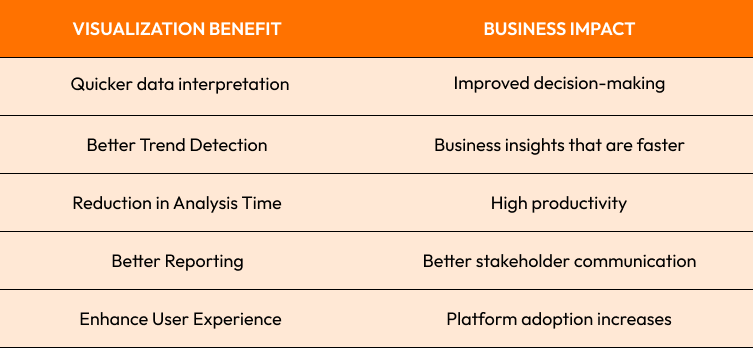
Strong opinion:
If users require extensive training in order to understand the dashboard, then it has failed to achieve its main purpose.

Choose the right charts and graphs for different types of data
The wrong type of chart is one of the most common mistakes made in visualisation.
Different formats are available to display different types of data. Selecting the wrong format can cause information distortion or interpretation difficulties.
Charts are a common type of chart:
Trends in time as shown by line charts
Comparative bar charts of categories
Simple pie charts
Scatter plots in correlation analysis
Heatmaps for pattern detection
Treemaps are used to display hierarchical information
It is important that the chart matches up with any questions you are asking.
As an example:
A line graph is the best way to show revenue growth across several years.
Bar charts are better for comparing product categories.
Geographic mapping can be used to improve customer distribution.
Netflix employs highly optimized visual techniques to track streaming performance, infrastructure and user engagement in global markets.
Strong opinion:
Many dashboards suffer "chart overload," where the visual complexity increases faster than users' understanding.
It is usually the most simple visualization that best communicates the intended message.
Dashboards with Visual Hierarchy and Information Architecture
The Strong visual hierarchy allows users to focus first on the most critical information.
It is not necessary to pay equal attention to all metrics. Visually, the most important insights must be highlighted. Supporting information can remain without competition.
Hierarchy techniques are:
Typescaling
Use of color in a strategic way
Layout Positioning
Contrast levels
White Space Management
The user scans interfaces naturally in predictable patterns. The best dashboards are aligned with this behavior.
As an example:
The key performance indicators (KPIs) should be displayed at the very top.
Supporting metrics will follow in a logical order.
The secondary details are still visible but not as prominent.
Microsoft Power BI conducted a case study that showed dashboards with a clear hierarchy improved user error rates and reporting accuracy.
Information architecture is also important. The data should be organized logically to allow users to understand metrics easily.
Strong opinion:
Users stop understanding what is important when charts are large and colorful.
Good hierarchy creates focus. Clarity is created by a great hierarchy.
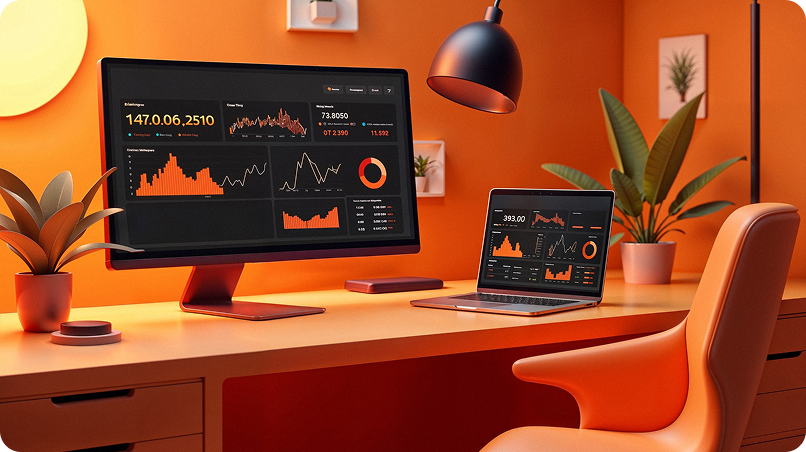
Designing user-friendly analytics dashboards
The modern analytics dashboards should balance usability and functionality.
Adoption rates may decline even if a dashboard contains valuable information.
Successful dashboard design focuses on:
Simplicity
Consistency
Clear Navigation
Take Action:
Responsive layouts
Some important dashboard design principles include:
- Prioritize Key Metrics
Prioritise the information that is most important to your business.
- You Can Use Progressive Disclosure
Display summary information first and let users explore the details later.
- Maintain Consistent Layouts
Navigation should be easy to understand and familiar on all pages.
- Support Mobile Accessibility
Dashboards are increasingly accessed by decision-makers via their smartphones and tablets.
Shopify’s dashboard for merchants is a good example. The dashboard presents information such as sales, orders and customer activities in an easy-to-understand format.
Strong opinion: A dashboard's purpose isn't to show off data collection abilities, but to help with decision making.
Dashboards should provide answers to questions, and not just more.
Reduce cognitive load when presenting complex data
cognitive load can be a major challenge in Data Visualization Design.
Each chart, number, color and interaction takes mental energy. Users become overwhelmed when too much information is displayed at once.
The following are some of the most common causes of cognitive overload:
There are too many charts displayed on the screen
Visual styles that are inconsistent
Excessive color usage
Poor labeling
Unclear relationships between metrics
Reducing cognitive load requires deliberate design decisions:
- Simplify Visual Elements
Take out any decorative elements which do not promote understanding.
- Use Patterns That Are Consistent
Predictable chart labels and styles.
- Focus on What Matters
Focus user attention on critical insights
- Reduce Data Density
Information is presented in sections that are easily manageable.
Google Looker's platform simplifies reporting to allow users to focus more on insight rather than the interface.
Nielsen Norman Group research consistently shows users are more productive when they reduce mental effort.
Complex information does not need complex design. The more complex the information, the simpler it should be presented.
Last Thoughts
Effective data visualization design is all about turning information into knowledge.
The ability to clearly present data is becoming a key competitive advantage as organizations are increasingly driven by data. Visual reporting is a powerful tool that helps users to identify and solve problems faster, as well as make better decisions.
Every design decision has an impact on how the information is perceived. From selecting the best charts for various types of data up to creating intuitive analytics dashboards.
Common visualisation challenges:
Chart misuse
Poor hierarchy
Information Overload
Weak dashboard organization
Cognitive effort
The Best Practices
Chart types and data goals should be matched
Build strong Visual Hierarchy
Prioritize actionable insights
Simplify dashboard layouts
Reduce cognitive load whenever possible
Strong opinion:
Successful dashboards don't display as much data, but rather make sure that the correct data is displayed.

Are you ready to build better data experiences?
Crescentic Digital helps businesses create data-driven platforms and reporting systems that transform complex information into useful insights.
Are you looking for the best UI/UX design for business dashboards or enterprise apps?
Visit our Contact page and create visual experiences to help users better understand, make faster decisions, and get better results.
Visit our to learn more about how we can design digital experiences that are clear, accessible, and performant.
Start Your Expert Consultation
Please write your name and contact information below. We will respond as soon as possible.